 Veraclimb
Guide · Under the hood
How Veraclimb reads your climbing
No black box, no mystery score. Here is the actual pipeline — what it measures, how, and exactly when it refuses to answer.
1 · Your phone finds your body — and never uploads it
When you analyze a clip, Veraclimb runs Apple's Vision body-pose engine on your iPhone. For every frame it estimates the positions of your joints — wrists, elbows, shoulders, hips, knees, ankles — and, crucially, a confidence value for each joint: how sure the model is that it actually found your elbow, versus a shadow or a hold that looks like one.
Nothing is uploaded. There's no server, no account, no third-party AI service watching your footage. The "AI" here is computer vision plus geometry, running locally — which is why the analysis is free and unlimited: it costs us nothing when you use it, so we don't meter it.
2 · Smoothness: a real measurement, not a rating
From the tracked joints we compute your center of mass frame by frame, then measure how smoothly it moves using log dimensionless jerk (LDJ) — a standard smoothness measure from motor-control research. Jerk is the rate of change of acceleration: controlled, deliberate movement keeps it low; hesitation, stabs, and barn-doors spike it.
LDJ is a negative number, and closer to zero means smoother. When the app shows LDJ −5.2, that's not a grade or a percentile — it's the measured property of how your body's mass moved through the attempt, comparable against your own history on the same problem.
Alongside the number you always get the skeleton overlay and the exact frame the reading came from. If the skeleton wasn't locked onto your body, you'll see it — and you should distrust the number. That's the point: you can check our work.
3 · The confidence gate: silence over wrongness
Every measurement has a minimum-confidence requirement on the joints it depends on. Hidden limb? Baggy chalk-bag shadow? Shaky vertical video shot from a weird angle? If per-joint confidence drops below the threshold, Veraclimb doesn't lower its certainty bar — it says nothing, and tells you it couldn't read the moment clearly.
This is the core design decision of the whole app. A confidently wrong cue is worse than no cue: it sends you off to fix a problem you don't have. We'd rather be silent and honest than fluent and wrong.
4 · Foot cuts — labeled experimental, on purpose
Veraclimb also detects foot cuts (feet leaving the wall) geometrically. It's shown only on slab and vertical walls and carries an experimental label, because the current version can't reliably distinguish a deliberate cut from a slip — and until it can clear our precision bar in validation, we won't present it as more than it is.
5 · What it deliberately doesn't do
- No 0–100 technique score. A single opaque rating of "how well you climbed" can't be verified by the person receiving it — and end-to-end video-scoring models are wrong far too often to coach anyone honestly.
- No hold detection. "You missed the foot chip" is beyond what a phone video can support reliably. Guessing would violate the design rule above.
- No beta suggestions, no chatbot coach. Veraclimb shows you what it measured and leaves the climbing decisions to you.
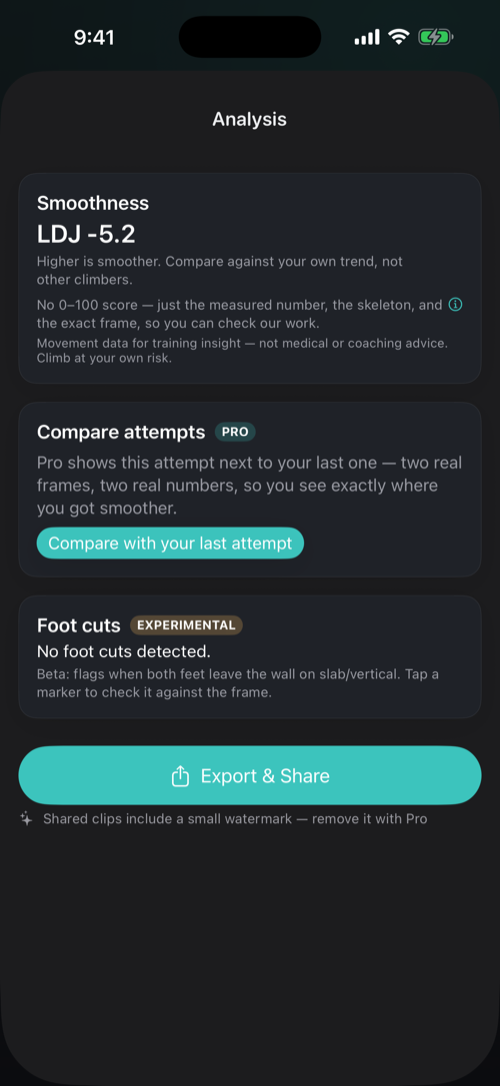
The contract, in one line: every cue arrives as skeleton + measured number + the exact frame, and when confidence is low you get silence instead of a guess. If we can't show you the evidence, we don't say it.
See it on your own climbing. Film one side-on attempt and watch the pipeline run on your phone — free, unlimited, no account. Get Veraclimb →